Anti-AI detection forAI OnlyFans and FanVue models
Platforms are getting stricter with AI content. If your AI OFM assets look too synthetic, that can mean more flags, weaker reach, slower review, and higher shadowban risk. Use the Anti-AI Converter first, then verify changes with our AI Detector.
Moderation risk dashboard
A simple visual for the stricter AI-content review environment.
Review mode
Manual checks rising
Account risk
Flags can stack
Convert
Layered anti-detection edits
Detect
Measure detector confidence
Publish
Use cleaner OFM assets
Stricter moderation passes
Platforms are reviewing AI-heavy uploads more aggressively, especially when an account publishes polished synthetic content at scale.
Account flags and manual review
Repeated suspicious uploads can trigger account quality checks, slower approvals, or extra trust and safety review.
Shadowban and reach loss
Even when content stays live, lower distribution, weak discovery, or reduced recommendation visibility can hurt OFM funnels.
Detector-driven screening
Detection systems often combine visual texture checks, metadata gaps, and synthetic noise analysis before content is escalated.
AI OFM accounts get flagged when the image signal looks too synthetic
Most enforcement does not rely on one clue. It is often a stack of weak signals: smooth textures, missing metadata, frequency fingerprints, and camera-inconsistent noise. That is why the converter focuses on layered changes instead of one heavy filter.
Detection signal map
A built-in visual showing the common signal families detectors inspect.
Texture smoothness
HighUniform skin and fabric texture can read as synthetic rather than camera-captured.
Metadata profile
MissingNo camera history or implausible export fingerprints can look suspicious in review flows.
Noise pattern
CleanReal cameras produce messy micro-noise. AI often leaves a cleaner and more regular signal.
Frequency balance
FlatSynthetic outputs can show unnatural frequency distribution and repeated smoothness bands.
Before and after converter example
The same comparison asset used on the Anti-AI Converter page, placed here to show the visual shift before the workflow steps below.
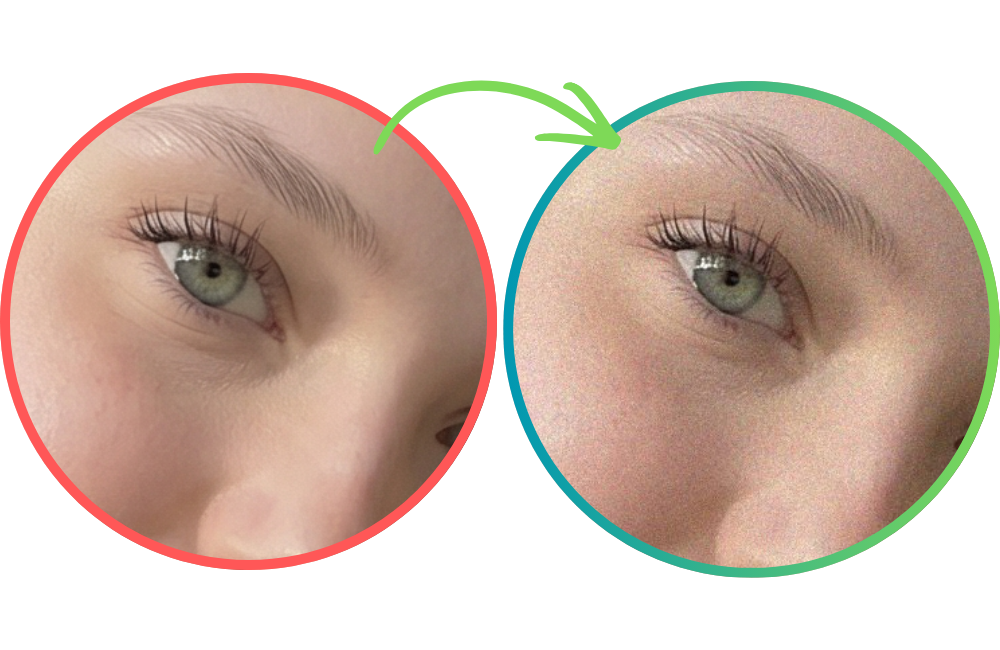 AI-generated
Generate the visual
Create the OFM asset, promo image, or model photo set in your preferred AI workflow.
Run Anti-AI Converter
Add camera-like texture, noise variation, and export behavior with a layered anti-detection pipeline.
Validate with AI Detector
Check detector confidence before publishing so you can tune strength without guessing.
Publish cleaner assets
Use more camera-native looking exports for profile images, teasers, and funnel creatives.
Where this is useful in AI OFM
Practical AI OFM use cases for cleaner-looking synthetic assets.
AI OnlyFans model profile photos that need a more camera-native finish
FanVue teaser posts and preview drops that should avoid obvious synthetic texture
Promo creatives for Reddit, X, Telegram, and paid traffic funnels
Landing page hero images for AI OFM agencies and creator storefronts
Retention content batches where consistency matters across many uploads
Why the converter and detector belong together
Convert first. Then validate. That keeps the workflow measurable.
Converter-first workflow for AI OFM teams that need fast publish loops.
AI Detector is built into the story as the verification step, not an afterthought.
Client-side processing keeps source assets local while you test iterations.
Subtle layered changes are safer than one aggressive filter that destroys image quality.
Recommended sequence
AI OFM FAQ
Why are AI OnlyFans and FanVue accounts getting flagged more often?
Platforms are getting stricter about synthetic content quality, moderation signals, and trust scoring. That can mean closer review, account flags, or reduced reach when uploads look heavily AI-generated.
Can the Anti-AI Converter guarantee lower detector scores for AI OFM content?
No. Detector behavior varies by platform and model version. The converter is best used as part of a test-and-validate workflow, with the AI Detector helping you check results before publishing.
Why mention the AI Detector on this page if the main CTA is the converter?
Because anti-detection work should be measurable. The converter changes signal patterns, and the detector gives you a practical way to compare confidence before and after processing.
Can this help with shadowban risk on AI OFM accounts?
It can help you publish assets that look less obviously synthetic, but no tool can guarantee distribution outcomes. Shadowban behavior is platform-specific and can depend on many account-level signals.
Start with the converter.Validate with the detector.
Use PhotoRadar to reduce obvious AI detector signals, review outputs with the AI Detector, and ship more camera-native looking creative assets for AI OnlyFans and FanVue workflows.