Anti-AI Image & Video Converter
Adjust AI-image signals and compare the result. Images and short videos stay in your browser. Results vary by detector.
Try it free — sign up to download your result
2 of 2 trial runs left · no account needed to test
Drop images here or click to browse
PNG, JPG, JPEG, WEBP, HEIC, HEIF
PNG, JPG, WebP, HEIC - up to 3 images, max 30.0 MB each.
Balanced — ideal for ~2K images. Good protection with minimal visible change.
By using this tool, you agree to our Terms and Privacy Policy. If you upload files, they are processed according to the selected tool workflow.
This tool changes image signals — it does not generate content. If you publish AI-generated or manipulated material showing real-looking people, places or events, any legally required AI disclosure remains your responsibility — don't use this tool to strip one.
Free vs Pro
See all Pro features| Capability | Free | Pro |
|---|---|---|
| Converter runs | 3 free runs / 30 days | |
| Batch size | 3 images | 20 images |
| Max strength | Up to 0.85 | Up to 2.0 + SynthID |
| Experimental SynthID layer | ||
| Advanced EXIF spoofing | ||
| Video mode | 3 clips / 30 days | Unlimited |
Powered by
To use the latest version of this tool, visit SynthGuard.
How the Anti-AI Detection Pipeline Works
AI image detectors often rely on statistical fingerprints: unnatural frequency distributions, synthetic noise consistency, missing camera metadata, and predictable color-channel relationships.
Image mode breaks those signals across 15 transformation layers: PRNU sensor-fingerprint injection, FFT frequency disruption, sensor-noise simulation, color decorrelation, texture perturbation, chroma subsampling, an ISP tone curve, lens vignette, chromatic aberration, blur–sharpen balancing, JPEG double compression, fake EXIF data, dimension break and the experimental SynthID layer. Instead of one strong manipulation, it combines subtle edits that look natural together while reducing detector confidence.
Short-video mode is intentionally lighter: it refreshes metadata, trims a tiny amount from both ends, applies a mirrored spatial shift, rotates by less than 1 deg, zooms to fit, and adds a subtle filter before exporting MP4.
Before and after Anti-AI conversion
A quick visual reference showing the kind of camera-style shift the layered converter aims for before you validate detector confidence.
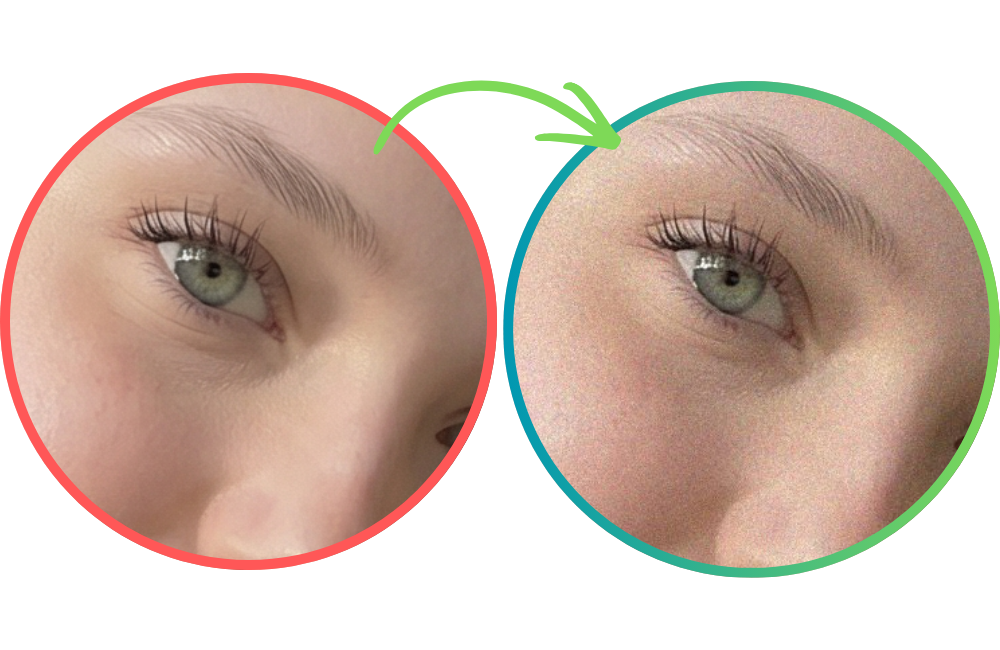 AI-generated
Start with medium strength
Validate after each export
Avoid repeated re-processing
Keep originals for audit trails
Built for AI OFM & Fanvue creators
AI creators on OFM and Fanvue are dealing with stricter moderation signals across distribution channels. Instagram and TikTok label content their systems detect as AI-generated, and creators widely report reduced reach and slower review once a post is flagged.
That makes robust pre-publishing workflows essential. This converter is designed to help AI model creators lower detector signals before posting, so content has a better chance of passing platform checks while still looking natural to real viewers.
Related Tools
Anti-AI Converter FAQ
Does it work against all AI image detectors?
Does Anti-AI conversion reduce visual quality?
What file formats are supported?
Are my files uploaded to a server?
Can I process short videos on the same page?
How do I reduce AI-detector signals in generated images?
Can Instagram detect AI-generated images?
How to make Midjourney images look real?
Does adding EXIF data influence AI detectors?
Can this tool remove Google's SynthID watermark?
Need to Verify a Photo Instead?
Use our AI Location Search to analyze architecture, signs, vegetation, and landscape clues to identify where a photo was taken.
On this page