Pipeline last updated: 31 August 2026 · 15 active signal layers
Make AI ImagesUndetectable
AI detectors often flag Midjourney, DALL-E, and Stable Diffusion images within seconds. A free 15-layer browser pipeline reduces common AI-detection signals and adds camera-realistic characteristics so outputs look closer to real photographs. Results vary; no guarantee against any specific detector or platform moderation.
Why AI Detectors Flag Your Images
Modern AI detectors analyze four signal dimensions that AI generators always get wrong. Understanding these is the first step to reducing common detector signals.
Uniform noise patterns
Real cameras produce sensor-specific noise. AI images have unnaturally smooth or repetitive noise — detectors spot this instantly.
Missing frequency artifacts
JPEG compression leaves characteristic frequency signatures. AI-generated images skip this step, creating a statistical gap detectors exploit.
Absent or fake metadata
Real photos carry detailed EXIF data — camera model, lens, GPS, shutter speed. AI images have none or obviously synthetic metadata.
Perfect pixel consistency
Camera sensors introduce micro-variations across every shot. AI-generated images are too statistically consistent, which classifiers detect.
How to Reduce AI-Detection Signals on AI Images
Four steps to reduce the signals AI detectors look for — lower detection scores in our tests, no guarantee.
Upload your AI image
Drag any AI-generated image into the converter. Supports JPEG, PNG, WebP, and HEIC from Midjourney, DALL-E, Stable Diffusion, Flux, or any generator.
Run the 15-layer pipeline
The converter applies sensor noise, PRNU fingerprints, FFT disruption, texture perturbation, and 10 more camera-realistic layers simultaneously.
Validate with the AI detector
Immediately check the output with the built-in AI Image Detector. See the confidence score drop in real time — no tool switching needed.
Download & use confidently
Export the processed image with realistic EXIF metadata. Ready for Instagram, TikTok, stock sites, portfolios, or any platform with AI moderation.
Before vs. After: AI Detection Confidence
See how the 15-layer pipeline reduces detector signals. Left: raw AI output flagged at high confidence. Right: processed image with a lower detection score in our tests (no guarantee).
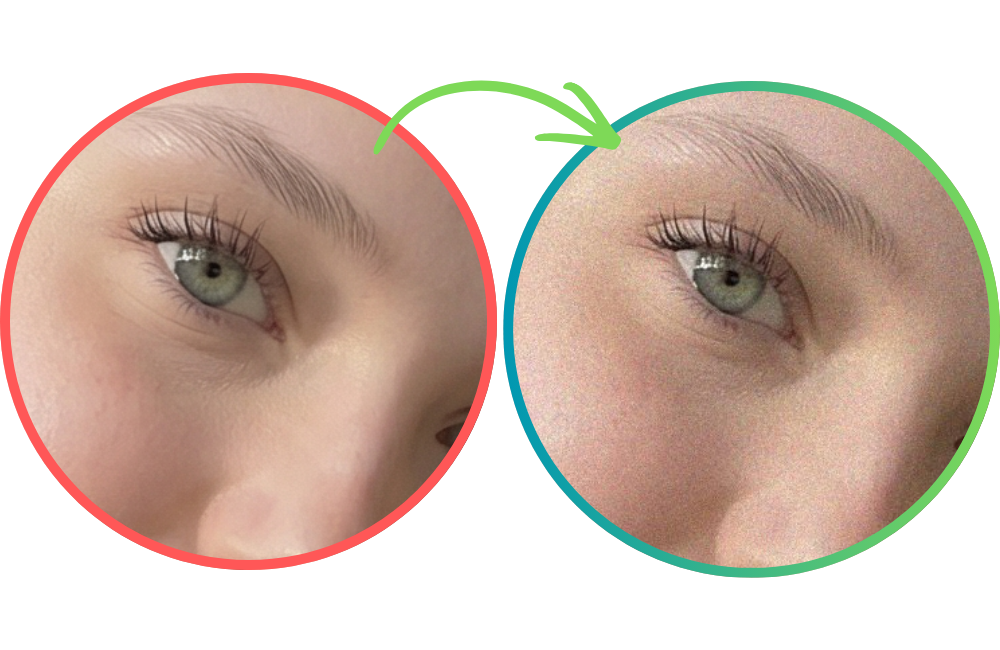 AI-generated
15 Signal Layers. One Click.
Each layer targets a specific detection vector. Together, they reduce common detector signals across frequency, noise, color, and compression.
Your Images Never Leave Your Device
The entire 15-layer pipeline runs locally in your browser using Canvas APIs and Web Workers. Zero server uploads. Processing happens in your browser; analytics only with your consent.
Pipeline update · August 2026
What changed in the 15-layer pipeline this year
Detectors moved from single-signal classifiers toward combined statistical models, so the converter added camera-realism layers instead of stronger noise. Three optics and ISP layers are new — ISP tone curve, lens vignette and chromatic aberration — plus a dimension break that trims 1–5 px so an output no longer matches a generator's exact 1024×1024 or 1536×1024 canvas.
Preset strengths were recalibrated as well: Subtle now runs at 15 and Balanced at 35, which keeps visible quality intact while still shifting several detector signals at once. Short videos run through the same idea via a hardware-accelerated WebCodecs path with automatic downscaling for large clips.
Go deeper on a specific question
Every layer explained, with what each detector signal actually measures.
Convert, test, iterate — the free browser loop and its realistic limits.
Step-by-step removal workflow including detector validation.
What is realistic, what is marketing, and how to measure the difference.
What each generator gives away in metadata, dimensions and pixel statistics.
Which part of platform AI labelling you can change, and which one you cannot.
Frequently Asked Questions
How do I reduce AI-detector signals in generated images?
Upload your AI image to the Anti-AI Converter, run the 15-layer pipeline, and validate with the built-in AI Image Detector. Increase the processing strength and re-run if the detector confidence is still too high. The convert → validate → iterate loop is the most reliable approach.
Which AI generators does this work with?
The converter works with all major AI image generators including Midjourney, DALL-E 3, Stable Diffusion XL, Flux, Adobe Firefly, and Leonardo AI. It targets statistical patterns common to all diffusion models.
Can AI detectors still catch processed images?
No tool can guarantee that a processed image will evade detection because detection models are continuously updated. However, the 15-layer pipeline addresses common signals detectors look for, including noise patterns, frequency artifacts, metadata, and pixel consistency.
Is this tool free to use?
A free tier with a limited number of free uses is available. Paid plans unlock unlimited conversions, detector validation, and access to all PhotoRadar tools.
Are my images uploaded to a server?
No. The entire pipeline runs locally in your browser using Canvas APIs and Web Workers. Your images never leave your device — zero server uploads. Processing happens in your browser; analytics run only with your consent.
What is the difference between this and adding a filter in Photoshop?
Single-layer edits like blur or noise are trivial for modern detectors to see through. The Anti-AI Converter applies 15 simultaneous signal-level changes across frequency, texture, noise, metadata, and compression dimensions — something manual editing cannot replicate.
Does this remove C2PA or watermarks embedded by AI tools?
The pipeline replaces EXIF/metadata and disrupts pixel-level patterns, which removes most embedded provenance signals. However, invisible watermarks using advanced steganography may partially survive depending on the technique used by the generator.
Reduce AI Detector Flags on Your Images
Upload, convert, validate, and download — all in your browser, all in under 10 seconds.
Pro: unlimited conversions — stop rationing your 3 free runs
Unlimited converter runs · Batch up to 20 images · 10 MB uploads · $7.50 first month (RADAR50), then $14.99/mo