The World's Data,
Live on One Map
Cameras, flights, fire hotspots, earthquakes, natural events, satellites, weather, and humanitarian data — fused into one interactive 3D globe for discovery and situational awareness.
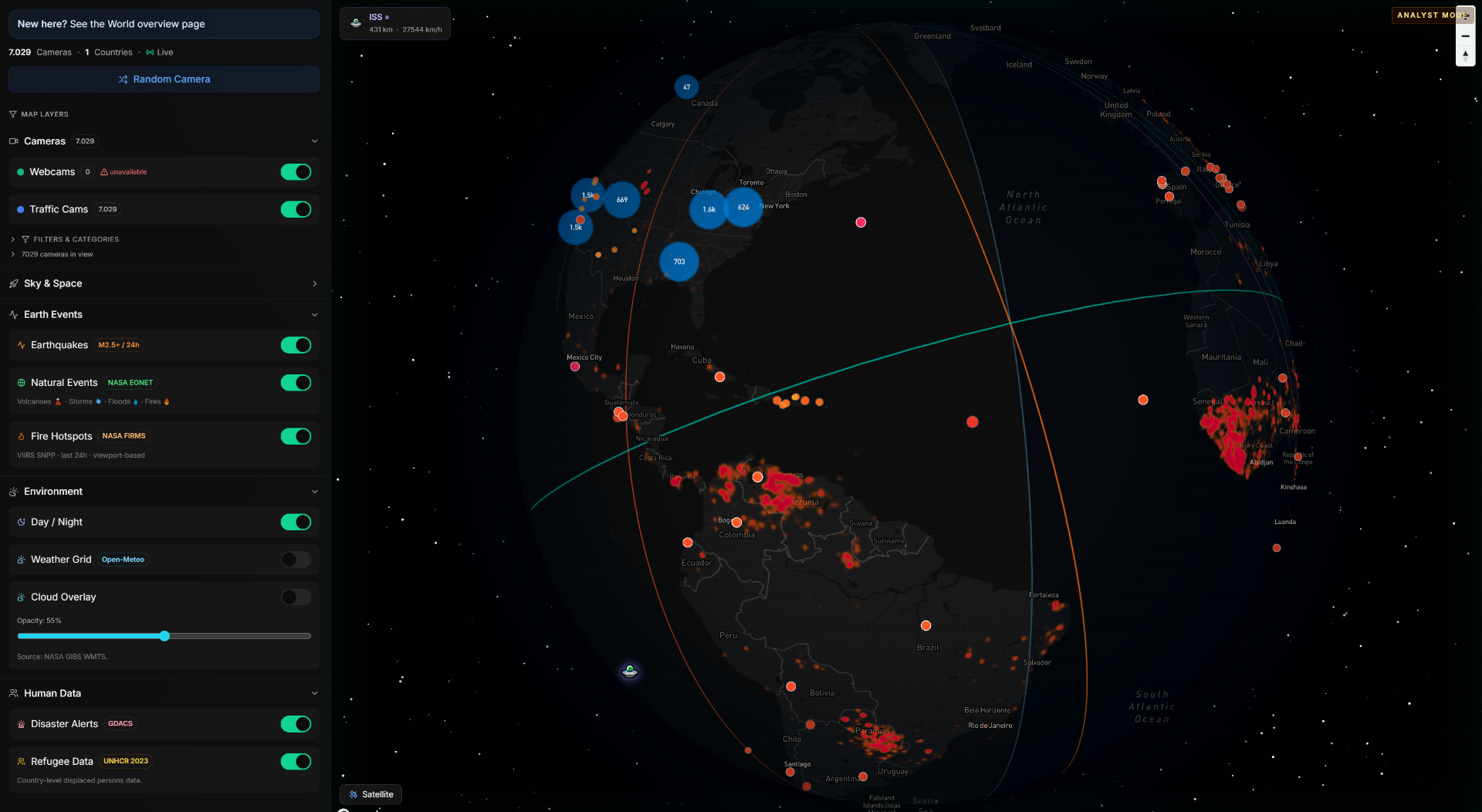
Three Steps to Global Awareness
No setup, no API keys, no configuration. Just open and explore.
Open the explorer
Launch the interactive 3D globe. No account needed to start exploring — layers load instantly.
Activate layers
Toggle cameras, flights, fires, earthquakes, natural events, weather, and more from the accordion sidebar.
Investigate and discover
Click any marker for details. Zoom into regions. Switch analyst modes. Jump from global overview to street-level.
Everything You Can Explore
Nine distinct data layers from trusted public sources. Toggle any combination on one globe.
Live webcams
Thousands of public camera feeds across coastlines, cities, mountains, airports, and landmarks — filterable by country and category.
Traffic cameras
Road-level live views from 19+ countries for situational awareness, route checks, and regional monitoring.
Live flights
Real-time aircraft positions from OpenSky Network. Click any plane to see callsign, altitude, speed, and flight track.
Fire hotspots
Active wildfire detection from NASA FIRMS satellite data. Heatmap overlay with individual hotspot detail for the last 24 hours.
Natural events
Volcanoes, cyclones, floods, wildfires, and ice events from NASA EONET — automatically categorized with live status on the map.
Earthquakes
USGS real-time seismic data (M2.5+) with magnitude-scaled markers. Click for depth, time, and nearby cameras.
ISS and satellites
Track the ISS live with smooth animation, plus orbital presets for Hubble, Sentinel, Landsat, and more via TLE data.
Weather and clouds
Temperature grid, NASA GIBS cloud overlay with opacity control, and GDACS disaster alerts — all on one surface.
Refugee data
UNHCR displacement statistics as a country-level choropleth overlay — making humanitarian context visible at a glance.
One Globe, Infinite Context
12 public APIs, fused into layered geospatial intelligence you can explore in real time.
Built for Real-World Use
From emergency response to data journalism — professionals trust World for fast, layered global context.
OSINT & verification
Cross-reference live cameras with disaster alerts, flight data, and natural events to verify claims and build context fast.
Travel & scouting
Preview destinations in real time, check weather, and find live camera angles before trips or photo shoots.
Breaking news
Jump between affected regions, live cameras, fire hotspots, earthquakes, and flight patterns — all without switching tools.
Education
Show global motion, natural events, day-night cycles, weather patterns, and refugee data in one explorable interface.
Emergency response
Overlay fire hotspots, earthquakes, and weather alerts with camera feeds to build real-time situational awareness.
Data journalism
Layer humanitarian data, natural events, and live feeds to explore stories in their geographic context.
Powered by trusted public APIs
All data is open-source. No proprietary lock-in. Updated in real time.
Trusted by Professionals
"World gives us faster visual context than jumping between separate webcam sites, flight trackers, and alert dashboards."
"The fire hotspot layer alone saved us hours during wildfire season. Having cameras and FIRMS data on one map is incredible."
"From earthquakes to flights to refugee data — it feels like a real intelligence surface, not just a webcam directory."
Frequently Asked Questions
12 Data Sources. One Globe. Zero Setup.
Open the explorer and start combining live cameras, flights, fire hotspots, earthquakes, natural events, weather, and humanitarian data on one interactive 3D map.